2020-2021
·
YLD
ASAP Hub
Research Collaboration Platform for Parkinson's Science
ASAP (Aligning Science Across Parkinson's) is a research initiative, run in partnership with The Michael J. Fox Foundation, that funds scientists around the world working on the causes of Parkinson's disease. The Hub is the platform where those scientists find each other, meet and share their research. I led the design of three new features for it, including the one at the core of the product.
ROLE: Product Designer & Design Lead
PLATFORM: Desktop · Tablet · Mobile web

The Project
ASAP funds research teams across many labs and institutions in different countries. The Hub was built to connect them, and the next step was to help them work together: forming groups around shared topics, meeting regularly, and sharing research outputs that the rest of the network could find and use.
I worked on the project through YLD as the design lead, in a remote team of nine: two people in product and design, five engineers and two project managers, based in the UK and Portugal, with the product owner and the client in the US. The engagement lasted six months, from the first workshop to the handoff to engineering.
The brief was to design three new features for a platform that was already live, within fixed deadlines.


What I Owned
Research, planning and design of the Groups section, including group pages, the calendar and events
Research and design of the core feature of the platform, the Research Outputs Management System
Planning the onboarding process for new users
Running workshops with the client and presenting design progress to stakeholders
Defining new user types with the client and the engineering team
Design for desktop, tablet and mobile, from low fidelity wireframes to final UI and empty states
The Challenge
Researchers on the platform don't stay in one place for the length of a programme. They change teams, change labs and sometimes change location, and their research outputs need to stay correctly credited when they do.
This affected more than the data model, because the way authorship is handled decides where each output appears: on the researcher's profile, on the page of the team they belonged to when they published it, on the page of their new team, or in more than one of these places.
On top of this, the new features had to be added to a platform that people were already using, within deadlines that were already set.
Groups, Calendar and Events | Three Parts of One Feature
Planned as one feature, made of three parts that launched together.
From the client's point of view, all three parts support the same activity: a group of scientists meeting regularly to discuss their research and sharing what comes out of those meetings.
Groups organised teams into larger groups, each with its own page showing its members, its areas of expertise and its calendar. The calendar brought all group events together in one place, and users could subscribe to it so that events appeared in their own calendar. Events covered both online and in-person meetings, which are often planned months in advance, with separate pages for upcoming and past events holding the meeting materials and contact details.
I started with client interviews and a workshop, then organised everything that came out of them into a board of goals, requirements, deadlines, challenges and open questions. Mapping the features against the two deadlines showed that new user roles would be needed, such as group leaders, presenters and followers, so I defined these with the team and took them to the client for sign-off before moving into design.


Two Structures
Comparing the Options
There was more than one way to add the new features to the platform, and each option had consequences for the rest of it.
In the proposed option, groups sat inside the existing network section alongside users and teams, with events and a master calendar connected to them. In the alternative, groups and events became a section of their own. The choice affected navigation across the whole platform, so I mapped both structures and presented them, with the implications of each, to the team and the stakeholders.
I also worked with the engineers and the PM on an initial timeline, which we then shared with the stakeholders.


The Research Outputs Management
The Core of the Product
The Research Outputs Management System was my main focus within the design team.
Researchers needed a single place to find the research produced across the network: articles, datasets, protocols, bioinformatic tools, lab resources and presentations. To make outputs searchable and correctly credited, each one needed structured information attached to it, so a large part of the work was deciding what that information should be.
We planned it in two phases. In the first, users could create their own research outputs and share them on the platform. The second, more complex phase imported existing research through APIs, which meant working closely with the engineering team while they explored what was technically possible.
Before designing any screens, I mapped what a research output could be and what information each type would need, so that the engineers and I agreed on what could come in through the APIs and what would have to be entered by hand.
The last part was labs. Researchers belong to labs as well as teams, and teams belong to groups, so adding labs meant looking again at how all of these relate to each other. We started from the basic functionality, informed by user research and feedback.


Metadata
Deciding What Each Output Needs
Each field was a balance between making outputs easy to find and keeping them quick to publish.
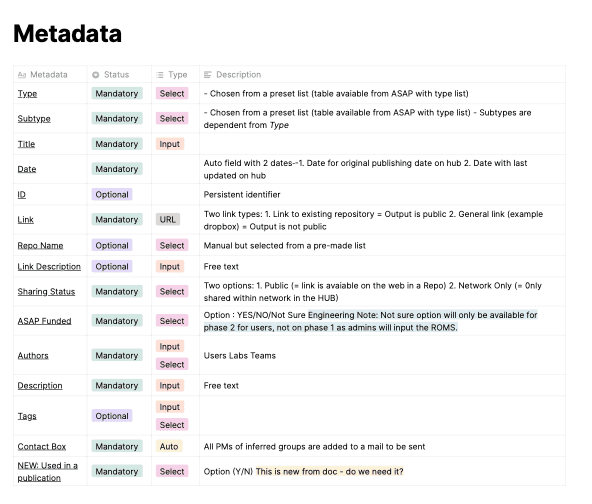
Type, subtype, title and date were mandatory, because outputs can't be searched or sorted without them. Fields such as the persistent identifier and the repository name were optional, since not every output has them. Sharing status needed its own field, because it decides whether an output is public or only visible within the network.
I documented all fifteen fields, recording whether each was mandatory or optional, its input type and a description, along with the questions that were still open for the engineers. This table was what the engineering team built from.

Authorship
What Happens When People Move
Authorship was the other big challenge of ROMS, in both phases.
Because researchers change teams and labs over time, we had to decide what happens to their research outputs when they do. I mapped this on two timelines. The first follows a researcher: joining the Hub, publishing an output, changing team, changing lab, and finally leaving the Hub when the grant period ends. The second follows a team through the same period, as it gains and loses members and labs, until its own grant period ends.
At each point we defined where the outputs appear and who is responsible for them. When a researcher changes team, for example, their new outputs appear under the new team, their earlier ones stay with the team they were published under, and all of them remain on their profile. When an account is removed at the end of a grant, the PM stays the point of contact for its outputs.
We also had to allow for authors without an account, since not everyone named on a piece of research is a member of the Hub.
The result was a simple rule: authorship on an output never changes over time, while teams and labs change around it. Because the same rule applies on every page, an output shows the same authors wherever it appears.


The Interface
Showing a Lot of Information Clearly
Each research output carries a lot of information, and all of it needed to stay readable in a list.
A single output can include a type, title, authors, teams, labs, dates, an identifier, access instructions and tags. I designed four versions of the list item, showing authors by name, by picture, with a summary of their teams and labs, or as a count of users, teams and labs, to find the right balance between detail and readability.
In the final design, users can switch between a card view, which shows more information for each output, and a list view, which fits more outputs on the screen. Search and filters help users narrow down the results, and the results can be exported to CSV.
I also designed the empty states. Meeting materials are usually added within a week of an event, so instead of showing an empty panel, the page tells users that the materials are coming and to check back later.
Every screen was designed for desktop, tablet and mobile.


solution
The Platform
Three new features added to a platform that was already live: groups with their calendar and events, a system for sharing research outputs, and an authorship model that keeps each output correctly credited as researchers change teams and labs.


OUTCOME
What It Became
The three features were designed and handed over to engineering, with demos for the client along the way.
3
features
designed
6
user types
defined
6
months, workshop
to handoff
Researchers change teams and labs during a programme, so the record of who produced each piece of research had to stay the same.
Get in
touch
Linkedin ↗
Senior & Lead product design roles.
UK or remote.
Reach out if you'd like to know more.
hello@martinasartor.com